Introduction — The 60 Mpx Problem
A single Sony a7r IV RAW ≈ 120 MB. A typical shoot: 50–200 shots → 2–5 GB of RAW + 500 MB–1 GB of exports (DNG masters, web versions, social cuts).
My goal: zero friction between capture, development, backup, and publishing. No manual copies, no “where’s that file?”, no full disk at the worst moment.
Global Architecture — Big Picture
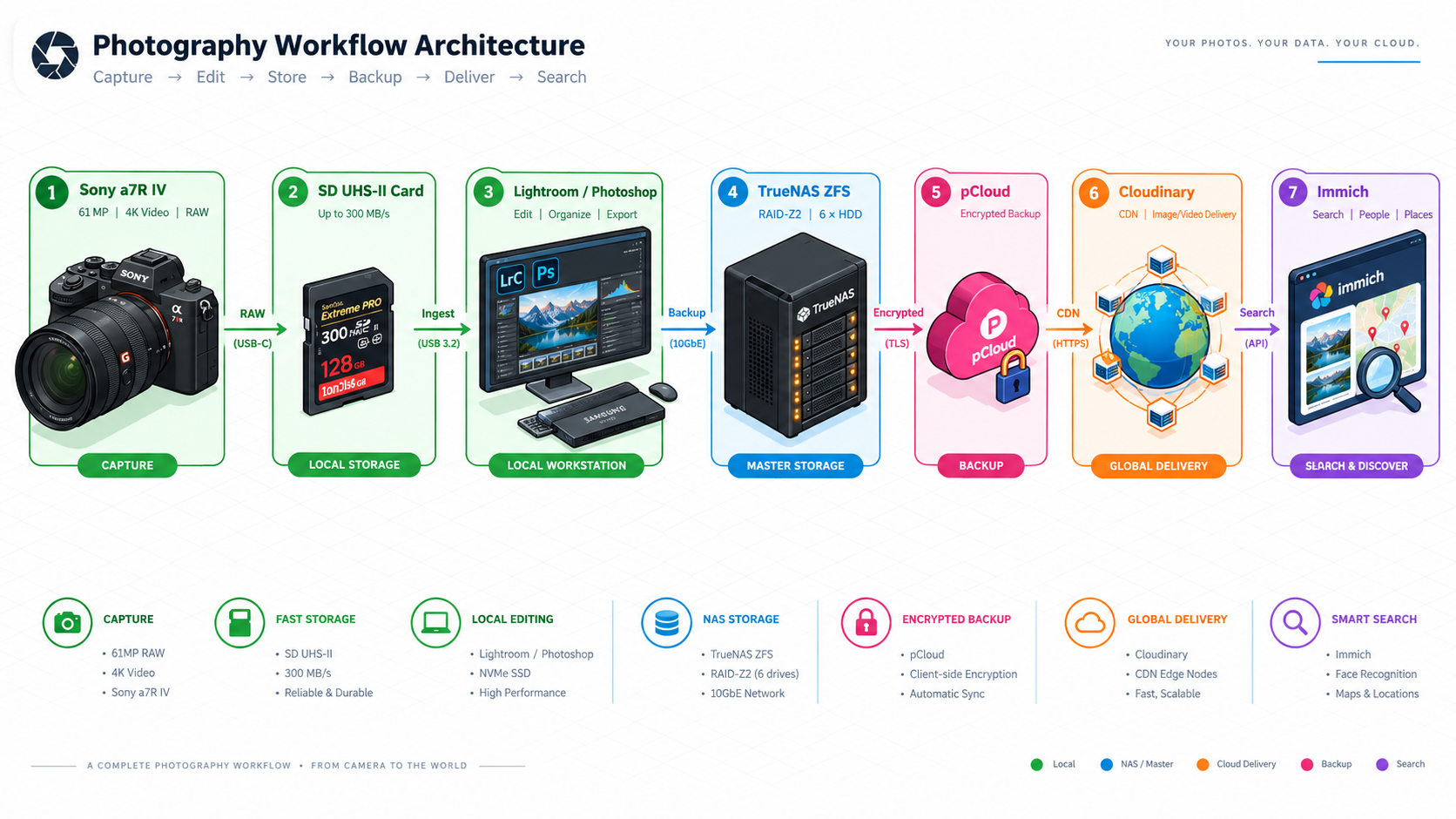
Legend:
🟢 Local (NVMe SSD) — 🔵 Master Storage (NAS ZFS) — 🟠 Delivery (Cloudinary CDN) — 🩷 Off-site Backup (pCloud encrypted) — 🟣 Search (Immich)
Step 1 — Ingestion & Culling (Lightroom)
- Import directly to local NVMe SSD (max speed, zero network latency)
- Cull & reject before copying to NAS — only keep what’s worth keeping
- Standardized naming:
YYYYMMDD_Collection_XXXX.ARW
Example: 20260315_Murmurs_0042.ARW
- IPTC metadata at import (via Lightroom import preset):
- Copyright:
© Frédéric Le Monnier
- Location (GPS if available, else city/region)
- Hierarchical keywords:
Landscape > Forest, Technique > Long Exposure, etc.
💡 Tip: a “Portfolio” import preset applies naming + IPTC + base keywords in one click.
Step 2 — Development & Exports (Photoshop)
Direct follow-up to my Photoshop Recipe #1 (dominant color cast fix) and future recipes.
From the developed master (PSD/TIFF 16-bit), three automated exports via a Photoshop “Export Trio” action:
| Use Case |
Format |
Max Dimension |
Compression |
Destination |
| Archive Master |
TIFF 16-bit / PSD |
9504 × 6336 (full 60 Mpx) |
Lossless (ZIP) |
01_DEVELOPPEES/ |
| Web Portfolio |
AVIF / WebP |
2400 px (long edge) |
q_auto:eco |
02_EXPORTS_WEB/ |
| Social Media |
JPEG |
1600 px (long edge) |
q=80 |
03_EXPORTS_SOCIAL/ |
“Export Trio” Photoshop Action (one keyboard shortcut):
- Duplicate master → convert to 8-bit sRGB
- Resize + output sharpening (bicubic, 0.3 px)
- Save 3 versions to correct NAS folders (via mounted SMB path)
- Write clean EXIF/IPTC (no Photoshop history bloat)
Step 3 — NAS: Master Storage & Network Access
Hardware (details in Why a NAS?):
- TrueNAS Scale (native ZFS)
- AMD Ryzen 7 + 64 GB DDR5 ECC
- 7 × Seagate IronWolf 4 TB → RAID-Z2 ≈ 10 TB usable, 2-drive failure tolerance
Folder Structure (mounted as Z: / /Volumes/Photos):
/mnt/pool/photos/
├── 00_RAW_MASTERS/           # Original RAW (read-only after validated import)
│   └── 2026/03_Murmurs/
├── 01_DEVELOPPEES/           # Developed TIFF/PSD masters
│   └── 2026/03_Murmurs/
├── 02_EXPORTS_WEB/           # AVIF/WebP for Cloudinary
│   └── 2026/03_Murmurs/
└── 03_EXPORTS_SOCIAL/        # JPEG for IG/Bluesky
    └── 2026/03_Murmurs/
ZFS Protections:
- Daily snapshots (kept 30 days) → instant recovery of deleted/modified files
- Monthly scrub (1st of month, 03:00) → silent error detection/correction
- Local replication: 2nd USB pool for monthly cold copy (drive powered off)
Step 4 — Off-site Backup: pCloud (Client-side Encrypted)
TrueNAS → pCloud via rclone + crypt (nightly cron 02:00):
# /root/scripts/rclone_crypt_sync.sh
rclone sync /mnt/pool/photos/ pcloud_crypt:photos \
  --transfers 4 --checkers 8 --bwlimit 20M \
  --log-file /var/log/rclone_pcloud.log \
  --progress
- Client-side encryption:
rclone config → pcloud_crypt (crypt on top of pcloud:) → pCloud only sees encrypted filenames + encrypted blobs
- Retention: 90-day versioning + 1-year trash (pCloud settings)
- Cost: ~€180 “2 TB lifetime” (promo) → €0/year recurring
⚠️ Annual restore test: I pull a 2023 RAW from pCloud → verify integrity (SHA256 hash) → OK.
Auto-upload: Python watchdog script watches 02_EXPORTS_WEB/ → Cloudinary API upload on new file detection.
Cloudinary Presets (configured in dashboard):
| Preset |
Transformation |
Use Case |
portfolio_large |
w_2400,f_auto,q_auto:eco |
Main article image / lightbox |
portfolio_thumb |
w_600,c_fill,g_auto,f_auto,q_auto |
Grids, thumbnails, search |
og_image |
w_1200,h_630,c_fill,g_auto,f_auto |
Open Graph / Twitter Card |
Jekyll Integration: each collection photo has a cloudinary_id in front-matter → custom Liquid tag:
{ % cloudinary portfolio_large { { page.cloudinary_id } } alt:"{ { page.title } }" % }
Generates automatically:
<picture> with source type="image/avif", source type="image/webp", fallback <img>- Responsive
srcset (400w, 800w, 1200w, 2400w)
loading="lazy" + decoding="async"
Signed URLs (1-year expiry) → cache control + hotlink protection.
Step 6 — Indexing & Search: Immich (Self-hosted)
Docker Compose on TrueNAS (same box, isolated network):
# docker-compose.immich.yml
services:
  immich-server:
    image: ghcr.io/immich-app/immich-server:latest
    volumes:
      - /mnt/pool/photos/01_DEVELOPPEES:/usr/src/app/upload:ro
    environment:
      - DB_HOST=postgres
      - REDIS_HOST=redis
  postgres: ...
  redis: ...
Features I use:
- Text search (IPTC keywords read from TIFFs)
- Geolocation (interactive map)
- Visual similarity (“find photos like this one”)
- Private shared albums (link-only, no RAW/NAS exposure)
Costs & Reality Check — 2026 Budget
| Item |
Upfront |
Yearly |
Est. Lifespan |
| TrueNAS DIY (CPU/RAM/6 HDD) |
~€1,200 |
€0 |
5–7 years |
| pCloud 2 TB lifetime (promo) |
~€180 |
€0 |
“Lifetime” |
| Cloudinary (free 25 GB) |
€0 |
€0 |
— |
| NAS Electricity (15 W average) |
— |
~€60 |
— |
| Total |
~€1,380 |
~€60/yr |
< €0.15/GB/yr |
Comparison: Adobe CC 1 TB = €120/yr, Google Photos 2 TB = €100/yr — no control, no RAW, no local indexing.
Automation — Key Scripts (Excerpts)
All versioned in my private GitHub repo photo-workflow (easy clone on new machine).
ingest.sh — SD → Local → Lightroom → NAS
#!/bin/bash
set -euo pipefail
SRC="/media/fred/SD_CARD/DCIM"
DST_LOCAL="/home/fred/Photos/Ingest/$(date +%Y%m%d)_$1"
mkdir -p "$DST_LOCAL"
rsync -av --progress "$SRC"/ "$DST_LOCAL"/
# Lightroom auto-imports from watched folder
# Post-import script renames + moves to NAS
export_trio.jsx — Photoshop Action (JavaScript)
// Export Trio - shortcut F12
var doc = app.activeDocument;
var baseName = doc.name.replace(/\.[^\.]+$/, '');
var exportPath = "/Volumes/Photos/02_EXPORTS_WEB/2026/03_Murmurs/";

// 1. Archive TIFF 16-bit
saveTIFF(doc, "/Volumes/Photos/01_DEVELOPPEES/2026/03_Murmurs/" + baseName + ".tif");

// 2. Web AVIF 2400px
resizeExport(doc, 2400, exportPath + baseName + ".avif", "AVIF", 75);

// 3. Social JPEG 1600px
resizeExport(doc, 1600, "/Volumes/Photos/03_EXPORTS_SOCIAL/2026/03_Murmurs/" + baseName + ".jpg", "JPEG", 80);
cloudinary_sync.py — Watchdog → Cloudinary
#!/usr/bin/env python3
import cloudinary.uploader
from watchdog.observers import Observer
from watchdog.events import FileSystemEventHandler
import os, time

WATCH_DIR = "/mnt/pool/photos/02_EXPORTS_WEB"
CLOUDINARY_FOLDER = "portfolio/2026"

class Handler(FileSystemEventHandler):
    def on_created(self, event):
        if event.is_directory: return
        if not event.src_path.lower().endswith(('.avif', '.webp')): return
        time.sleep(2)  # wait for write to finish
        public_id = os.path.relpath(event.src_path, WATCH_DIR).replace(os.sep, '/')
        cloudinary.uploader.upload(
            event.src_path,
            folder=CLOUDINARY_FOLDER,
            public_id=public_id,
            use_filename=True,
            unique_filename=False,
            tags=["portfolio", "2026"],
            eager=[{"transformation": "portfolio_large"}, {"transformation": "portfolio_thumb"}]
        )

observer = Observer()
observer.schedule(Handler(), WATCH_DIR, recursive=True)
observer.start()
try:
    while True: time.sleep(60)
except KeyboardInterrupt:
    observer.stop()
observer.join()
rclone_crypt_sync.sh — Cron 02:00
#!/bin/bash
# /etc/cron.d/nas-pcloud-sync
0 2 * * * root /root/scripts/rclone_crypt_sync.sh >> /var/log/rclone_pcloud_cron.log 2>&1
Key Takeaways
📌 Separate concerns: master storage (NAS ZFS) ≠ web delivery (Cloudinary CDN) ≠ off-site backup (pCloud encrypted)
📌 Automate on the 2nd repetition: a script > 100 manual clicks, and it never forgets a step
📌 Encrypt client-side before any cloud: zero trust — the provider sees only noise
📌 Test restore 1×/year: an untested backup isn’t a backup
📌 Own your metadata: IPTC in-file = portable, readable by any tool (Immich, Lightroom, ExifTool, my Jekyll)
Conclusion
This workflow lets me:
- Shoot without worrying about space (16 TB usable, expandable)
- Develop at local NVMe speed
- Publish instantly worldwide (Cloudinary global CDN)
- Sleep soundly (ZFS snapshots + pCloud encrypted off-site)
- Find any image in seconds (Immich + IPTC)
Next step: Lightroom Classic → NAS via Smart Previews (offline editing, deferred sync) — dedicated article coming.
What are your thoughts on this? Share your experience in the comments below!